TallyPrime integration for Indian exporters
ExportEazy does not sync with TallyPrime live. It hands over files: for any period you choose, it writes your export invoices, buyer receipts and credit notes as a TallyPrime import file, and you or your CA import it into your Tally company. The Tally export workflow guide covers how to record these entries in Tally itself.
Updated 29 September 2026
What goes into Tally
Accounting vouchers in rupees, one per document, built so debits and credits agree to the paisa and the total equals the invoice’s rupee value. The ledger names are the ones you set, so the entries land on ledgers your accountant already uses.
| Voucher | When it is created in ExportEazy | What Tally receives | Fields carried |
|---|---|---|---|
| Sales voucher | An export invoice is issued. | The buyer’s party ledger debited against a new bill in the invoice number; the sales ledger for the invoice’s route (LUT, IGST paid or SEZ) credited, with freight, insurance and Output IGST on their own ledgers. | Invoice number and date, buyer, rupee value at the invoice’s exchange rate, and a narration with the foreign-currency amount and rate, LUT number, Shipping Bill number and date. |
| Receipt | A buyer payment is recorded against the invoice — or as an advance before it. The same payment feeds the eBRC and IRM record. | The bank ledger debited with what the bank credited, bank charges on their own ledger, the buyer credited at the invoice rate against the bill, and the difference on the exchange gain or loss ledger. | Receipt date, amount in foreign currency and rupees, the bank’s rate, charges, FIRC and bank reference. An advance goes in as bill type Advance; an excess over the bill goes On Account. |
| Credit note | A credit note is issued against an invoice. | The same ledgers as the sale, reversed, against the original invoice’s bill. | Credit note number and date, the invoice it reduces, rupee value and narration. |
Each voucher carries an ExportEazy reference, so importing the same period twice matches the vouchers already in Tally rather than adding them again. When you download a period that was downloaded before, the screen says how many of its documents Tally has already been sent.
What does not sync
- Nothing flows back from Tally. The file goes one way, and only when someone downloads and imports it.
- No stock items, units, HSN codes or inventory. Invoices go in as accounting entries; the foreign-currency amount and rate are in the narration, not in Tally currency masters.
- No purchases, supplier payments or journals. The file covers what you sell and what your buyers pay.
- Cancelled and replaced invoices are left out, and so is a foreign-currency invoice with no exchange rate entered. The screen lists each one with the reason.
- An invoice raised by one of your companies abroad is still posted with Indian Output IGST. Keep those out of an Indian Tally company until your CA has decided how to book them.
Set up in four steps
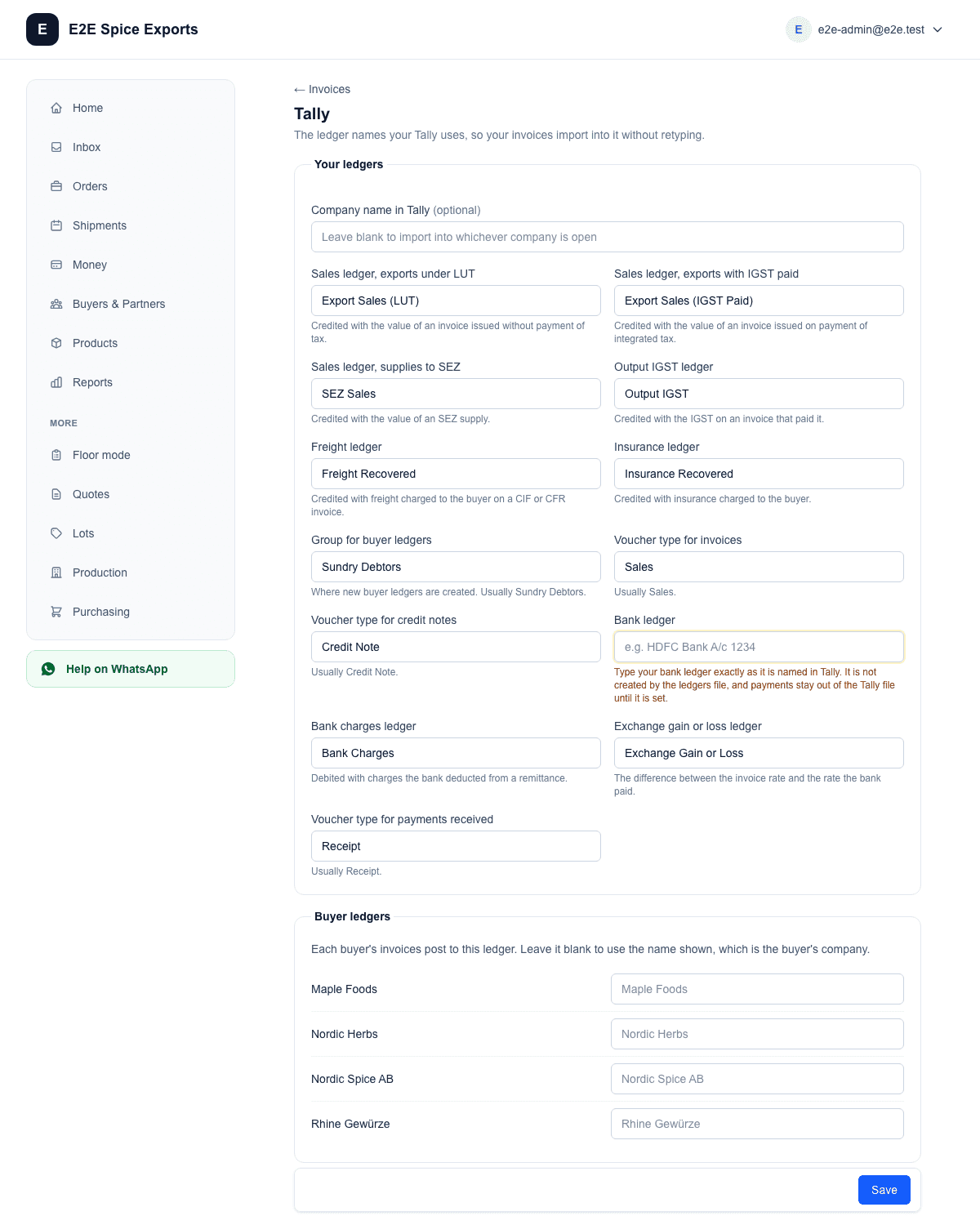
- Map ledgers. In Settings → Tally, under Your ledgers, type the Tally names of your sales, freight, insurance, Output IGST, bank, bank charges and exchange gain or loss ledgers, and the group for buyer ledgers. Under Buyer ledgers, give any buyer whose Tally ledger has a different name.
- LUT/IGST treatment. Each invoice posts to the sales ledger for its own route: Sales ledger, exports under LUT; exports with IGST paid; or supplies to SEZ. The route is the one chosen on the invoice, and the invoice’s LUT number goes into the narration.
- Review the batch. On Invoices, choose the period. The register lists every invoice and credit note in it, and says what will be left out of the Tally file and why. Register as CSV gives your CA the same list.
- Download and import in TallyPrime. The first time, download the Ledgers file and import it into Tally as masters. It creates any of your ledgers that are missing, by name and group only, and one ledger per buyer; it does not create the bank ledger, which must already exist. Then Download for Tally and import the vouchers. Back up the Tally company before importing, as Tally’s own import help advises.
Questions exporters ask
Does it work with TallyPrime 5 and Tally ERP 9?
The files use Tally’s standard XML import format, and our tests check that every voucher in them balances. We have not yet imported them into a running copy of TallyPrime 5 or Tally.ERP 9, so we do not claim either release. Import your first file into a test company, and tell us if anything is refused.
How are multi-currency invoices handled?
Each invoice goes into Tally in rupees at the exchange rate entered on the invoice, with the foreign amount, currency and rate written in the narration. A foreign-currency invoice with no rate is not sent until one is entered, because there would be no rupee figure to post.
Export invoice under LUT — which voucher type and GST treatment?
It goes in as a Sales voucher on the ledger you mapped for exports under LUT, with no IGST line; the LUT number is in the narration. The ledgers file creates that ledger by name only, so set its GST details in Tally for exports under LUT, as Tally’s export sales help describes. An invoice issued with IGST paid posts to its own sales ledger with the Output IGST line.
What happens when the bank receipt is less than the invoice?
The receipt settles only what arrived: the buyer is credited with that amount at the invoice rate, bank charges go to their own ledger, and the rest of the bill stays open in Tally and in ExportEazy. The RBI realisation period still runs from the date of export; the FEMA realisation deadline calculator gives the date.
Can my CA import the file instead of me?
Yes. Download the files and send them; your CA imports them into the Tally company they keep for you. The Tally export workflow guide lists what to check after the import.
Keep the shipment and the ledger in step
The invoice, the Shipping Bill and the bank’s remittance are recorded once in ExportEazy against the shipment, and the Tally file is made from those same records.